- Versatile for project management, business tracking, and personal wikis
- Highly customizable to adapt to specific team workflows
- Extensive library of templates provides a solid starting point
- Effective for managing high-value portfolios (e.g., $80 million across 30 projects)
- Maintains performance even with databases containing over 3,000 items
- Supports a vast ecosystem of 178 integrations including Slack, GitHub, and Jira
- Built-in AI features for finding answers and automating busywork
- Supports multiple languages including Arabic, Japanese, and Korean
- Users may spend more time organizing the tool than completing tasks
- Mobile application performance is reported as suboptimal
- Can become a 'productivity drain' due to over-customization and complexity
- Significant learning curve compared to simpler tools like Google Keep
- Known performance issues for some users regarding loading times and database speed

Quick Answer: Notion is a powerful all-in-one workspace that replaces separate apps for notes, tasks, and wikis. It offers unmatched flexibility for power users but can feel overwhelming for beginners due to its steep learning curve.
Best For: Teams and individuals who want a single, highly customizable hub to organize deep knowledge and complex projects.
Key Takeaways:
- ✅ Massive market trust with over 100M users and 62% of Fortune 100 companies onboard.
- ✅ High scalability evidenced by users managing $80 million portfolios across dozens of projects.
- ⚠️ Mobile performance lags behind the desktop version, making quick edits on the go frustrating.
- 💰 Pricing is very accessible, starting with a robust Free plan and $10/mo for the Plus tier.
Notion recently rebranded from Notion to Notion, keeping its name while sharpening its focus on AI-powered workflows. This review looks at how the platform combines documents, databases, and AI to help you manage work without switching tabs.
Ratings Breakdown
Notion provides a unique mix of simple note-taking and complex database management. While it excels in flexibility, its performance and ease of use vary depending on how you use it. We have rated the core aspects of the platform based on user feedback and technical capabilities.
| Category | Rating | Notes |
|---|---|---|
| Ease of Use | 6/10 | Simple to start, but mastering databases takes significant time. |
| Features | 10/10 | Offers everything from AI agents to complex relational databases. |
| Value for Money | 9/10 | The free version is incredibly generous for individual users. |
| Customer Support | 7/10 | Strong documentation, though direct human support can be slow. |
| Performance/Reliability | 7/10 | Desktop works well, but the mobile app is often slow to load. |
Overall: 7.8/10 – A top-tier productivity tool that demands a time investment to reach its full potential.
Pros and Cons (The Real Deal)
Choosing Notion means trading simplicity for total control over your digital environment. It is important to understand where the platform shines and where it might slow you down. Here is the honest breakdown of the strengths and weaknesses reported by long-term users.
✅ What Notion Gets Right
- Infinite Workflow Customization – You can build almost any system, from a basic grocery list to a professional CRM. The “block” system lets you drag and drop elements to design pages that fit your exact brain logic.
- Advanced Database Management – The platform handles over 3,000 items in a single database without losing speed. It supports complex relations, allowing you to link tasks to projects and projects to clients effortlessly.
- Massive Template Library – You never have to start with a blank page thanks to the 1.4M+ community members sharing layouts. These templates cover everything from YC-style pitch decks to habit trackers and student notes.
- Integrated AI Tools – The built-in AI helps find answers across your entire workspace and automates repetitive writing tasks. It reduces “tool sprawl” by keeping your research and your writing in the same window.
- Global Collaboration Support – Notion currently supports multiple languages including Arabic, Japanese, and Korean. This makes it a viable choice for international teams who need a shared knowledge base.
❌ Where Notion Falls Short
- Over-Engineering Productivity Trap – Many users spend more time organizing their workspace than actually finishing their work. The endless customization options can become a distraction that leads to “fiddling” rather than doing.
- Suboptimal Mobile Experience – The mobile app often feels like a mobile website wrapper rather than a native tool. It struggles with slow loading times and makes navigating large databases difficult on small screens.
- Steep Initial Learning Curve – New users often find the “blank slate” interface intimidating compared to simple tools like Google Keep. Mastering concepts like “Rollups” and “Relations” requires watching tutorials or reading manuals.
- Lack of True Offline Mode – While you can keep a page open without internet, the sync reliability is not perfect. You cannot easily browse your entire workspace or search for new pages while offline.
- Notification Noise – In large teams, the notification system can become cluttered and hard to manage. Users often complain that it is easy to miss important mentions in busy comment threads.
What is Notion?
Notion is an all-in-one workspace designed to reduce the need for dozens of different apps. It was built to solve the problem of “tool sprawl” by merging documents, wikis, and project management tools. Instead of jumping between Slack, Jira, and Google Docs, everything stays in one place.
The company has grown rapidly, now serving over 100M users worldwide. It is a staple in the tech industry, with over 50% of YC-funded startups using it to run their operations. Large enterprises also trust it, as shown by the 62% of Fortune 100 companies currently using the platform.
At its core, Notion is built on “blocks” like text, images, and tables. You stack these blocks to build pages, and you nest pages within each other to create a massive knowledge base. According to G2, it has been ranked the #1 knowledge base for three years running.
Key Features (Deep Dive)
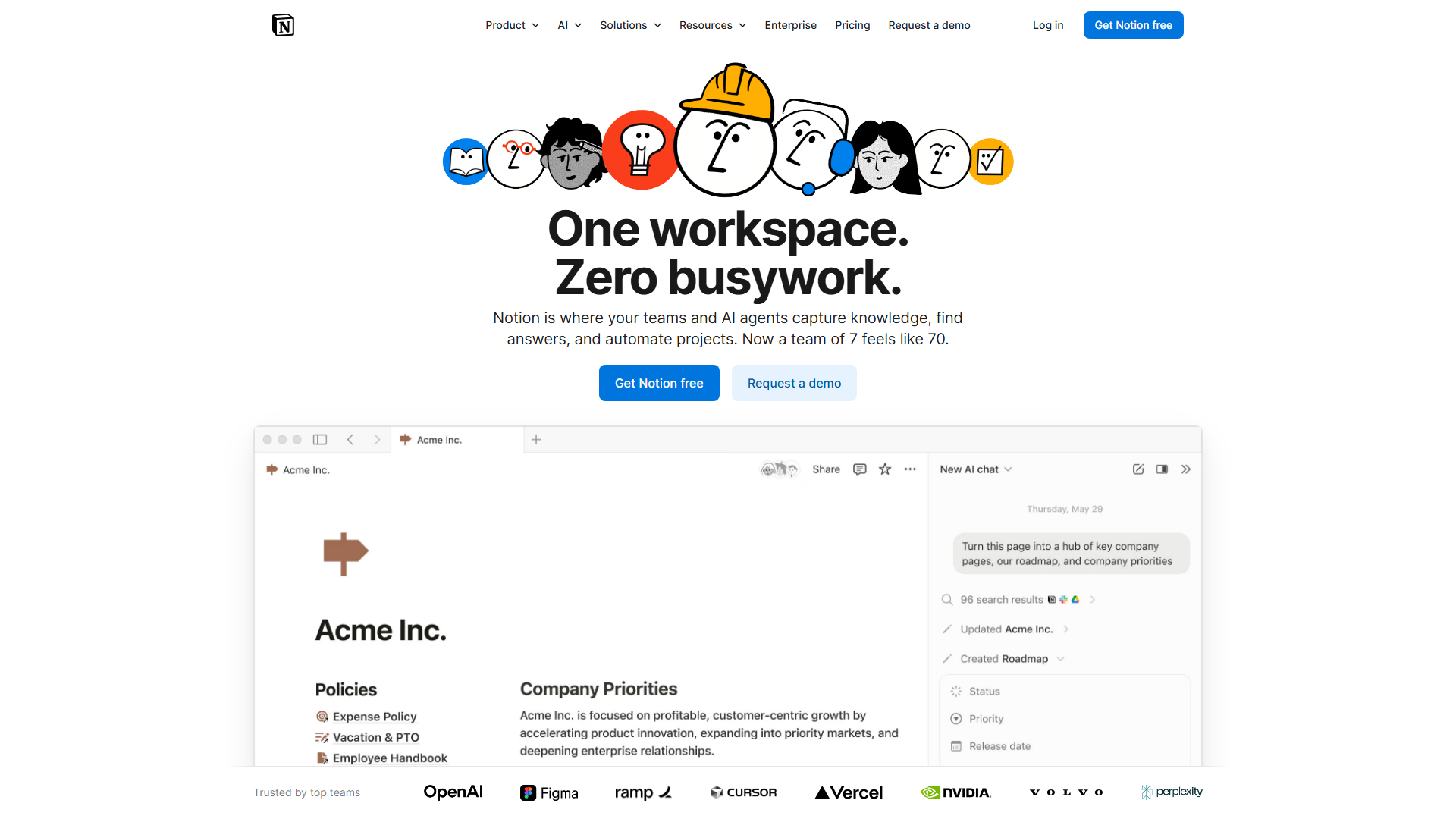
Notion is more than just a place to write notes. It functions as a flexible engine that you can program to handle almost any type of data. Here are the core features that define the platform.
Connected AI Workspace
The AI Writing Assistant and Notion Agent help you summarize long pages and generate new content. You can ask the AI questions about your existing documents to find info without searching manually. This feature acts like a second brain that remembers everything you have written.
Advanced Databases
Unlike a standard table, Notion databases can be viewed as boards, calendars, timelines, or galleries. You can add custom properties like dates, multi-select tags, and checkboxes to track any data point. This makes it a powerful replacement for dedicated tools like Trello or Airtable.
Internal Wikis
The platform is the industry standard for creating “Team Wikis” where companies store their handbooks and policies. Features like “verified pages” ensure that the information stays up to date. It allows teams to capture knowledge once and reuse it across multiple projects.
Integrated Calendar and Mail
Notion Calendar and Notion Mail (which syncs with Gmail) bring your schedule into your workspace. You can link specific calendar events to meeting notes or project pages with one click. This keeps your timeline and your work contextually linked at all times.
Enterprise Search (Beta)
This tool allows you to search across all your connected apps, not just Notion itself. If you have a file in Slack or a doc in Google Drive, Enterprise Search helps you find it from your Notion dashboard. It aims to be the single search bar for your entire professional life.
Site Builder
You can turn any Notion page into a public website with a few clicks. The platform offers basic forms and sites on the free plan, with custom domains available on paid tiers. It is a popular choice for portfolios, help centers, and simple landing pages.
Pricing and Plans
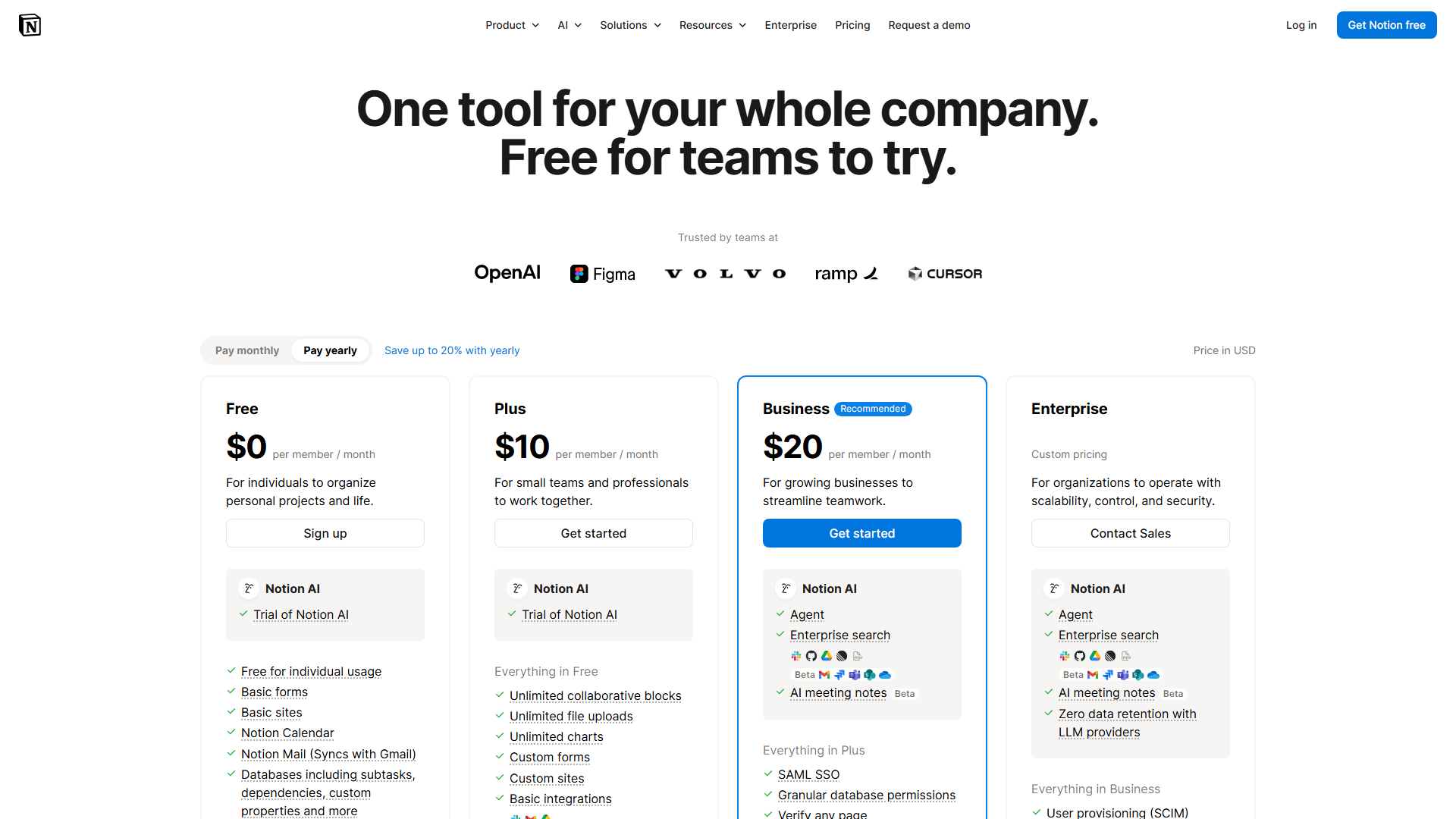
Notion uses a freemium model that is very generous for solo users but scales with team size. There are four main tiers designed to fit everyone from students to global corporations. Here is how the plans break down.
| Plan | Price | Best For | Key Limits |
|---|---|---|---|
| Free | $0 | Individuals | Limited team blocks |
| Plus | $10/mo | Small Teams | Basic integrations only |
| Business | $20/mo | Scaling Orgs | 90-day page history |
| Enterprise | Custom | Large Corps | Requires sales contact |
Hidden Costs to Watch For
Notion AI is an optional add-on that costs $8 per member per month when billed annually. If you want a custom domain for your Notion Site, you will also face separate renewal fees. While the core features are included, these extras can almost double your monthly bill.
Is It Worth the Price?
For individuals, the Free plan is one of the best deals in software today. For teams, the $10/mo Plus plan is competitive with tools like Monday.com or Asana. You get more flexibility for your money, but you also have to spend more time setting it up yourself.
Ease of Use & Getting Started
The setup process for Notion is nearly instant. You sign up with an email and can immediately start typing on a fresh page. However, the initial simplicity is deceptive because the tool has no fixed structure.
The learning curve is steep because Notion does not tell you how to work. You have to decide if you want a list, a folder, or a database. Most beginners feel lost for the first few hours until they discover the template gallery.
The UI is clean and minimalist, which helps reduce visual stress. Once you learn basic commands, like typing “/” to add a new block, the experience becomes much faster. However, the vast number of features means you will likely still be learning new tricks months after starting.
Integrations & API
Notion is built to be the center of your software stack. It currently supports 178 native integrations, which is more than most of its direct competitors. This allows data to flow freely between Notion and the other tools you use daily.
Top native integrations include:
- Slack
- GitHub
- Jira
- Google Drive
- Zoom
- Trello
- Asana
- Figma
- Zapier
- Make
The API is well-documented and developer-friendly, allowing for custom automations. You can use platforms like Zapier or n8n to connect Notion to thousands of other apps. While some automation features were previously limited, the addition of native “Database Automations” has simplified many workflows.
Customer Support
Notion offers a variety of ways to get help, though they prioritize self-service. Their help center is massive and includes video tutorials for almost every feature. The community is also a huge asset, as you can find answers on Reddit or YouTube easily.
Direct support is mostly handled via email or in-app chat. While the team is knowledgeable, response times can take 24-48 hours during busy periods. Business and Enterprise users get priority support, with Enterprise customers receiving a dedicated success manager.
The documentation is updated frequently to reflect new features. Since the community is so large, most technical problems have already been solved in public forums. If you like learning through community interaction, you will find plenty of support.
Security & Compliance
Notion has invested heavily in security to attract Enterprise clients. They now have 62% of the Fortune 100 on their platform, which requires high standards. The platform is SOC 2 Type 2 compliant and follows GDPR regulations closely.
For Enterprise users, Notion offers SAML SSO and SCIM for automated user provisioning. They also provide “zero data retention” with LLM providers for their AI features. This means your sensitive company data is not used to train global AI models.
Uptime is generally reliable, and they provide a public status page to track issues. However, because Notion is a cloud-based tool, you are dependent on their servers. If their system goes down, your ability to access your work becomes very limited.
Who Should Use Notion?
Notion is a “horizontal” tool, meaning it can be used for almost anything. However, it is particularly effective for certain types of users who need to organize a lot of moving parts. Here is who should consider it.
Perfect for: Knowledge-heavy teams – If your company has a lot of “how-to” docs and deep project history, Notion is the best place to store it.
Great for: Creative freelancers – It acts as a combined portfolio, project tracker, and invoicing system in one place.
Also suits: Students and educators – The ability to organize class notes, research, and schedules in one app is a major advantage.
❌ Notion is NOT For You If…
- You need a native-speed mobile experience – If you do 90% of your work on a phone, the slow loading times will frustrate you.
- You want a “ready-to-go” project manager – If you just want a simple list like Todoist, Notion’s complexity will feel like a burden.
- You are highly sensitive to “load times” – Large databases can sometimes take a few seconds to populate, which annoys power users who move fast.
What Real Users Are Saying
The general consensus on Notion is that it is the most powerful tool you will ever love and hate. Most users praise the “all-in-one” nature but complain about the friction of setting it up. It currently holds high ratings across G2 and Capterra.
Most Praised: Database cross-referencing, workspace flexibility, and the AI search feature.
Most Criticized: Mobile app performance, the learning curve, and “productivity procrastination.”
Average Rating: 4.7/5 across 5,000+ reviews on G2.
One common user quote is: “Notion is the house you build yourself; it’s perfect once finished, but the construction takes forever.” Another user noted: “I replaced five apps with Notion, but now I spend an hour a week just cleaning up my dashboard.”
Top Alternatives to Consider
If Notion feels too complex or too slow, there are several other options. Some focus more on the “doc” side, while others focus on the “task” side. Here is how they compare.
| Alternative | Best For | Starting Price | vs Notion |
|---|---|---|---|
| Obsidian | Privacy & Speed | $0 | Offline-first and faster |
| ClickUp | Heavy Projects | $7/mo | More built-in task features |
| Coda | Data Apps | $10/mo | Better at complex formulas |
Common Issues & How to Fix Them
Slow Loading for Large Databases
- Problem: When a database has thousands of entries, the page takes a long time to open.
- Solution: Use “Linked Views” with filters to show only the items you need right now.
Messy Sidebar
- Problem: As you add pages, the sidebar becomes a long, unorganized list.
- Solution: Use “Teamspaces” or “Favorites” to pin only the most essential pages to the top.
Mobile Sync Issues
- Problem: Data entered on mobile doesn’t always show up on desktop immediately.
- Solution: Always ensure the “cloud” icon in the top right has finished spinning before closing the app.
Final Verdict
Notion is a remarkable tool that truly can replace your notes, tasks, and wikis. It offers a level of customization that few other apps can match. While the mobile app needs work and the setup takes time, the payoff for a well-organized team is massive.
If you are willing to spend a few days learning the ropes, it will change how you manage information. If you just want a simple place to jot down quick notes, it might be overkill. Most people will find the most value in using it as a central hub for their most important work.
Rating: 8.5/10 – The most flexible workspace on the market today.
FAQ
Is the Notion Free plan actually unlimited?
Yes, for individual users, you get unlimited blocks and unlimited storage. If you add multiple team members, you will eventually hit a block limit that requires a paid plan.
Can Notion work offline?
Notion has very limited offline support. You can edit a page that is already open, but you cannot search or navigate to new pages without an active internet connection.
How does Notion AI compare to ChatGPT?
Notion AI is built directly into your pages, so it knows the context of your notes. While ChatGPT is better for general brainstorming, Notion AI is better at summarizing your specific company data.
Is Notion secure for sensitive business data?
Notion uses industry-standard encryption and has SOC 2 Type 2 certification. For maximum security, Enterprise plans offer more controls like SAML SSO and audit logs.
Why is the Notion mobile app so slow?
The app is essentially a web view of the desktop site. This makes it flexible for layout, but it requires more processing power and data than a native mobile application.
