
- Supports over 105 external integrations
- Facilitates cross-functional team collaboration
- Automates workflows with visual AI
- Comprehensive solution for product acceleration
- Supports six major global languages
- Potentially high corporate pricing costs
- Complex interface for new users
- Requires stable internet for canvas
- Steep learning curve for AI
- Pricing transparency concerns for enterprises

Quick Answer: Miro is the market leader for visual collaboration, offering an infinite canvas that replaces physical whiteboards and complex planning tools. It earned an 8.8/10 for its massive template library and powerful AI automation features.
Best For: Cross-functional teams at mid-sized to enterprise companies that need to brainstorm, plan roadmaps, and manage projects in a single visual space.
Key Takeaways:
- ✅ Massive integration library with over 105 external apps to sync your existing tech stack.
- ✅ Proven speed gains, helping brands like PepsiCo move from brief to launch in 10 months instead of 3 years.
- ⚠️ Steep learning curve for the advanced AI features and complex canvas navigation.
- 💰 Offers a functional free tier, while paid plans start at $8 USD per member per month.
Miro provides a digital canvas where teams can build anything from simple sticky-note brainstorms to complex technical diagrams. Originally founded as RealtimeBoard, the platform rebranded to Miro on March 20, 2019, to better reflect its expansive collaborative mission. This review explores how the tool functions as a central hub for innovation and whether it justifies its premium enterprise pricing.
Ratings Breakdown
Miro excels in feature depth and reliability but struggles slightly with the initial user experience for non-technical team members. The following ratings reflect its performance across core business requirements for 2024 and beyond.
| Category | Rating | Notes |
|---|---|---|
| Ease of Use | 7/10 | The canvas is simple, but advanced tools take time to master. |
| Features | 10/10 | Unmatched variety of templates, AI tools, and diagramming shapes. |
| Value for Money | 8/10 | Excellent free tier, though enterprise costs scale quickly. |
| Customer Support | 8/10 | Extensive self-help docs and active community forums. |
| Performance/Reliability | 9/10 | Smooth handling of large boards with hundreds of objects. |
Overall: 8.4/10 – A powerhouse for visual work that sets the standard for how distributed teams collaborate creatively.
Pros and Cons (The Real Deal)
Choosing the right collaboration tool requires weighing its technical strengths against its organizational friction. Miro is highly capable, but its depth can sometimes be a double-edged sword for smaller teams.
✅ What Miro Gets Right
Miro shines when teams need to see the big picture without losing track of small details. Its ability to bridge the gap between abstract ideas and concrete project tasks makes it a staple for product managers.
- Expansive Integration Ecosystem – It supports over 105 external integrations including Jira, Slack, and Google Drive. This allows teams to pull live data into the canvas without constantly switching browser tabs.
- Seamless Cross-Functional Collaboration – Multiple departments can work on the same board simultaneously without lag. Features like “bring to me” help facilitators guide hundreds of participants during large workshops.
- Visual AI Automation – The platform automates repetitive workflows with visual AI tools. Users can instantly turn sticky notes into organized clusters or generate entire mind maps with a single prompt.
- Accelerated Product Delivery – It serves as a comprehensive solution for product acceleration by linking plans to execution. Use cases like the Miro x Jira integration reduce overhead time and help increase overall team happiness.
- Global Language Support – The interface supports six major global languages, making it accessible for international teams. This ensures that non-English speakers can participate fully in the brainstorming process.
❌ Where Miro Falls Short
Despite its dominance, Miro has specific drawbacks that might make it overkill for certain organizations. Users frequently mention frustrations regarding cost and the technical requirements of the software.
- High Corporate Pricing Costs – Enterprise-level features come with a price tag that can be prohibitive for some companies. Pricing transparency remains a concern for large organizations trying to budget for thousands of seats.
- Complex Interface for Newbies – The sheer number of buttons and menus can feel overwhelming at first. New users often require a formal onboarding session to understand how to navigate without getting lost.
- Internet Connection Dependency – You must have a stable internet connection to load and edit data-heavy boards. There is currently no robust offline mode, which can be a dealbreaker for travelers.
- AI Learning Curve – While powerful, the AI Innovation Workspace requires users to learn specific prompt styles. Some teams find it faster to do work manually than to troubleshoot AI-generated outputs.
- Tool Redundancy Issues – Companies with existing project management stacks may find Miro overlaps with tools they already pay for. This can lead to “tool fatigue” if the implementation is not strictly defined.
What is Miro?
Miro is an AI-powered innovation workspace designed to help teams move from the first seed of an idea to a finished product. It was founded in 2011 and is currently headquartered in San Francisco and Amsterdam, serving millions of users worldwide.
The platform provides a visual canvas that functions as a shared digital space for brainstorming, planning, and design. It is used by major global brands like PepsiCo, Cisco, and Deloitte to manage complex technical workflows and remote workshops.
The core value proposition is the elimination of silos between different stages of project development. Instead of having a brainstorm in one app and a roadmap in another, Miro keeps everything in one searchable, zoomable environment.
Key Features (Deep Dive)
Miro has evolved from a simple whiteboarding app into a full-scale innovation environment. It uses an “Infinite Canvas” model where there are no borders to your workspace, allowing projects to grow as large as needed.
AI Innovation Workspace
This feature uses machine learning to assist with content generation and data organization. It helps teams summarize long brainstorming sessions and turn messy notes into professional-looking diagrams.
For teams stuck on a problem, the AI can suggest new ideas or expand on existing concepts. It acts as a digital sidekick that handles the “busy work” of manual formatting and data entry.
Intelligent Canvas
The canvas is more than just a drawing space; it understands the relationships between objects. When you move an object, smart connectors and alignment guides help maintain the professional look of your board automatically.
Compared to basic drawing tools, the Intelligent Canvas allows for complex layering and “frames” that act like slides in a presentation. This makes it easy to turn a messy workspace into a structured walkthrough for stakeholders.
Miro x Jira Integration
This integration allows users to turn sticky notes directly into Jira issues without leaving the Miro board. It ensures that the creative energy of a meeting translates immediately into trackable tasks for developers.
Teams using this feature have reported significant benefits in efficiency. For example, some users have reduced overhead time and improved their general workflow by syncing these two platforms.
Global Template Library
Miro offers over 300 pre-made templates for everything from Agile rituals to customer journey maps. You do not have to start from a blank screen, which saves hours of setup time for recurring meetings.
These templates are often created by industry experts and successful companies. Using them allows smaller teams to adopt proven frameworks from leaders in the tech and design space.
Technical Design Tools
For engineers and architects, Miro provides specialized shapes for UML diagrams, flowcharts, and entity-relationship models. It replaces the need for separate, rigid diagramming software that doesn’t support real-time collaboration.
The platform’s technical capability is robust enough to handle high-resolution exports and data-heavy blueprints. Professionals can build prototypes and wireframes that feel functional even before the coding phase begins.
Pricing and Plans
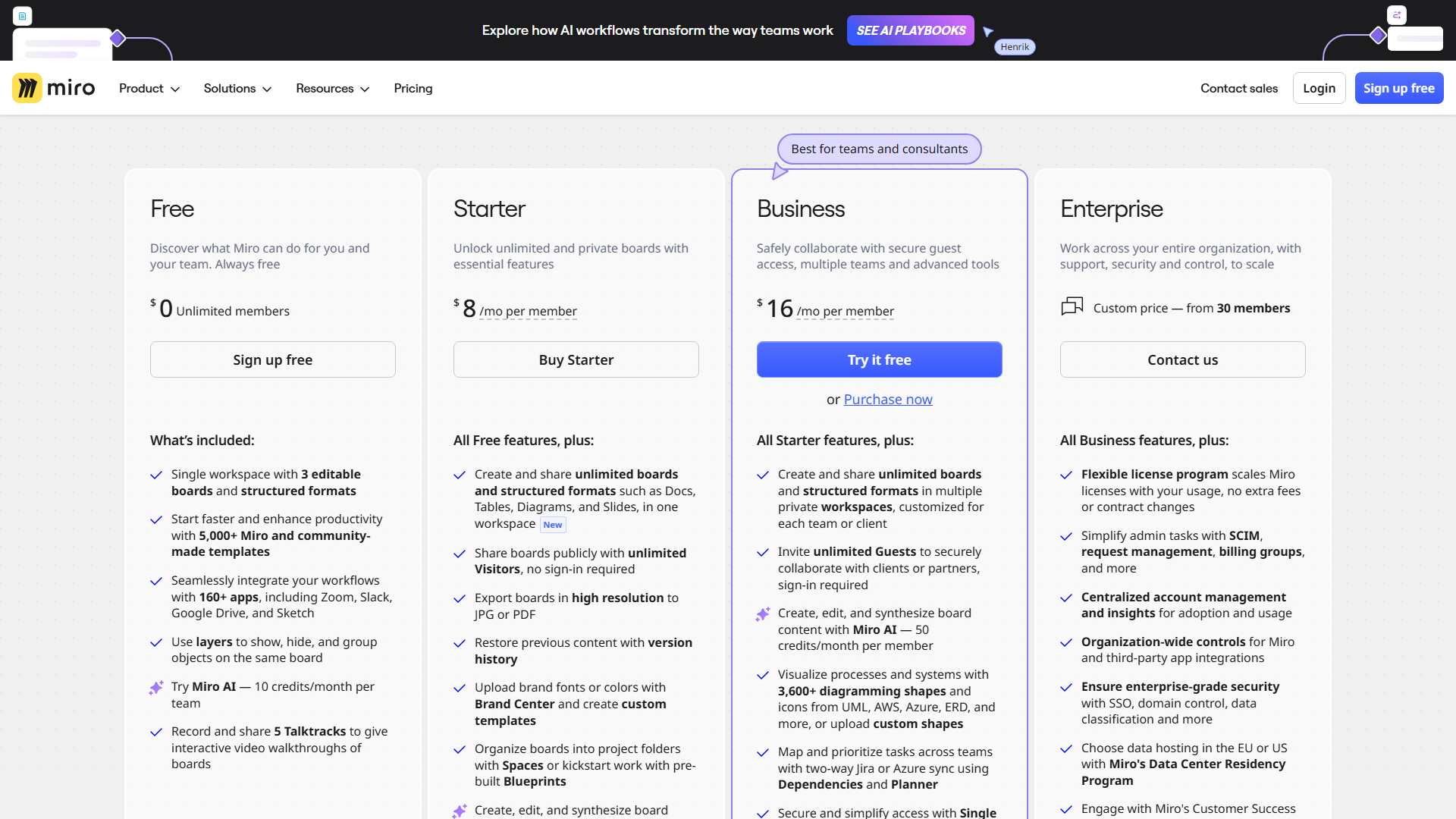
Miro offers a tiered subscription model designed to grow alongside your team size. The free version is surprisingly generous, though it limits the number of editable boards you can keep active at once.
| Plan | Price | Best For | Key Limits |
|---|---|---|---|
| Free | $0 | Individuals or small groups | 3 editable boards only |
| Starter | $8/user/mo | Small teams needing private boards | No single sign-on (SSO) |
| Business | $16/user/mo | Scaling companies with external guests | Requires annual billing for best rate |
| Enterprise | Custom | Large-scale security and compliance | Minimum seat requirements apply |
Hidden Costs to Watch For
While the per-user price is clear, costs can spike if you invite many “full members” who only need occasional access. You should manage your permissions carefully to avoid being charged for inactive accounts.
The Business plan is often necessary just to get advanced security features like Single Sign-On (SSO). If your IT department requires these standards, the $8 Starter plan will not be an option for you.
Is It Worth the Price?
For teams that work remotely, Miro is usually worth the investment because it replaces physical office supplies and travel time. The time saved in aligning stakeholders can easily pay for the monthly subscription fee.
If you only need a place to occasionally sketch ideas, the Free plan is plenty. However, power users will find the Business plan’s unlimited boards and guest access essential for professional client work.
Ease of Use & Getting Started
Setting up a Miro account takes less than two minutes using a Google or Slack login. The onboarding process asks about your role and goals, then suggests a few templates to help you get started immediately.
The learning curve is manageable if you start with basic sticky notes and shapes. However, mastering the “navigation logic”—specifically switching between select mode and hand mode—usually takes a few days of practice.
The UI is clean, with the most important tools pinned to a sidebar on the left. The performance remains snappy even when dozens of people are moving objects on the screen at the same time.
Integrations & API
Miro acts as a central hub by connecting to the tools your team already uses daily. It has a robust developer platform for companies that want to build custom internal plugins or automate data exports.
Native Integrations:
- Slack, Microsoft Teams, and Zoom for communication.
- Jira, Asana, Monday.com, and Trello for task management.
- Google Drive, OneDrive, and Dropbox for file storage.
- Adobe Creative Cloud and Figma for design file syncing.
The API is well-documented and supports the Model Context Protocol for secure data sharing. This makes it a favorite for enterprise IT teams who need to ensure data remains safe while being moved between different cloud services.
Customer Support
Miro provides a tiered support system based on your plan level. Free users have access to a massive help center, while Business and Enterprise users get priority email and chat support.
The Miro Academy is an excellent resource for learning. It offers free video courses that teach everything from basic navigation to advanced design thinking workshops.
The community forum is also very active. If you have a specific question about a template or a technical bug, you can usually find an answer from other users within a few hours.
Security & Compliance
Security is a major focus for Miro, especially given its large enterprise customer base. The platform uses AES-256 encryption for data at rest and TLS 1.2 for data in transit.
It holds major certifications including SOC 2 Type II, SOC 3, and ISO 27001. For teams in sensitive industries, Miro offers GDPR compliance and data residency options in the US and EU.
Admins have granular control over who can share boards or invite external guests. You can password-protect specific boards or restrict access to only users with a company email address.
Who Should Use Miro?
Miro is built for anyone who works on a team that needs to solve problems visually. It is particularly effective for groups that are geographically distributed and cannot meet in person.
Perfect for: Product Managers – They can manage the entire lifecycle from a brief to in-market launch in record time.
Great for: UX/UI Designers – It allows for rapid wireframing and gathering feedback from stakeholders in one place.
Also suits: Educators and Coaches – The canvas is ideal for running interactive workshops or teaching complex subjects visually.
❌ Miro is NOT For You If…
Miro is a heavy-duty tool, and it isn’t the right fit for every person or project. Some users might find it cumbersome or unnecessary for simple text-based work.
- You need a simple text editor – If you just want to take notes, tools like Notion or Google Docs are much faster and cheaper.
- You’re a solo freelancer on a budget – The free plan is limited, and the jump to paid tiers can be expensive for a single person.
- Your team has no design experience – Without a visual thinker on the team, the infinite canvas can become a disorganized mess very quickly.
What Real Users Are Saying
Common feedback across G2 and Capterra suggests that Miro is the “gold standard” for whiteboarding. Users love the flexibility but often warn about the potential for “board sprawl” where information gets lost.
Most Praised: The vast library of community-made templates, the smoothness of the real-time cursor tracking, and the quality of the Jira integration.
Most Criticized: The difficulty of managing permissions for external guests, the high price of the Business tier, and the lack of an offline mode.
Average Rating: 4.8/5 across over 5,000 reviews on major software review platforms.
One user noted that Miro helped their team “actually see what everyone was thinking,” which significantly reduced the number of follow-up meetings required to align on a project.
Top Alternatives to Consider
While Miro is the leader, competitors like FigJam and Mural offer specific advantages for certain niches.
| Alternative | Best For | Starting Price | vs Miro |
|---|---|---|---|
| FigJam | Design teams | $0 – $3/mo | Better integration with Figma files |
| Mural | Enterprise workshops | $0 – $10/mo | Deeper focus on facilitation tools |
| Lucidspark | Technical diagrams | $0 – $8/mo | Stronger link to Lucidchart data |
If your team already uses Figma for design work, FigJam is often a more cost-effective and integrated choice. For pure enterprise education, Mural offers slightly more “facilitator” locks and controls.
Common Issues & How to Fix Them
Most Miro issues stem from the complexity of the tool or the way users organize their data. Here are the most common gripes and their solutions.
The canvas feels laggy
- Problem: When boards get too many images or objects, they can slow down.
- Solution: Use the “Hide cursors” feature and clear your browser cache to improve performance.
I keep losing my work on the infinite canvas
- Problem: Users often zoom out and can’t find the section they were working on.
- Solution: Use the “Frames” panel on the bottom left to create a table of contents for your board.
Guest access is confusing
- Problem: Inviting people without accounts often leads to them being blocked by security settings.
- Solution: Set your board sharing to “Anyone with the link can edit” and add a password for security.
Final Verdict
Miro is the most capable visual collaboration tool on the market because it goes beyond simple drawing. It connects brainstorming to actual production work, helping teams like PepsiCo go from project brief to launch in 10 months rather than years.
If your company can afford the per-user cost, there is no better way to manage remote innovation. It provides the security, integrations, and reliability that professional teams need to ship products faster.
Rating: 8.8/10 – The essential workspace for any team that thinks in pictures and builds in sprints.
FAQ
What are the specific limitations of the Miro Free plan?
The Free plan allows for unlimited team members but only three editable boards. If you create a fourth board, the oldest one becomes “view-only” until you delete something or upgrade.
Does Miro complement or replace existing project management tools?
Miro usually complements tools like Jira or Asana rather than replacing them. It is for the “messy” creative phase, while project management tools are for tracking the final execution.
How much does Miro cost per user with annual vs. monthly billing?
The Starter plan is $8 per user per month when billed annually. If you choose to pay month-to-month, the price jumps to $10 per user.
Is Miro suitable for non-technical team members?
Yes, but they may need a 30-minute orientation. The basic functions like sticky notes are easy, but navigating a large, complex board can be intimidating for beginners.
Can you collaborate with external guests without a paid seat?
Yes, on the Business and Enterprise plans, you can invite unlimited “Visitors” to edit specific boards for free. The Free and Starter plans do not offer this level of guest access.
