
- Agentic search returns verified results
- Natural language prompting for searches
- Seamless CSV import and export
- Deep integrations for knowledge workers
- Powerful data enrichment capabilities
- Insufficient user reviews on G2
- Limited features on free profile
- AliExpress listings lack technical specs
- Uncertainty compared to competitor Tavily
- Performance below premium brands mentioned

Quick Answer: Exa is the top choice for developers building AI agents that need real-time web access without the clutter of traditional search results. It earns a 9.2/10 for its high accuracy and machine-optimized index that updates every minute.
Best For: AI engineers and data scientists who need to ground LLMs in fresh, verified web data or build autonomous research agents.
Key Takeaways:
- ✅ Achieves 94.9% accuracy on SimpleQA benchmarks for its Research API.
- ✅ Massive performance with 73% code search accuracy and 1-minute index updates.
- ⚠️ Pricing can become complex to track across five different usage-based endpoints.
- 💰 Starts with $10 in free credits and offers a flexible pay-as-you-go model.
If you have spent any time building AI agents recently, you know that traditional search engines often fail them. Google and Bing are made for humans to click links, but AI needs clean, structured, and conceptually relevant data to function. This review covers Exa, a tool formerly known as Metaphor, which has built a search engine from the ground up specifically for machines.
Ratings Breakdown
Exa stands out as a specialized tool in a crowded market of search APIs. While it may not have the name recognition of some legacy providers, its performance in AI-specific tasks is hard to beat. Here is how I rate it across the five most important categories for developers.
| Category | Rating | Notes |
|———-,——–,——-|
| Ease of Use | 9/10 | The API is clean and the Python/JS SDKs work right away. |
| Features | 9.1/10 | Includes search, crawl, and deep research in one platform. |
| Value for Money | 8.5/10 | Pay-as-you-go is fair but costs can spike with “Deep” modes. |
| Customer Support | 8/10 | Good technical docs but limited community forums for beginners. |
| Performance/Reliability | 9.5/10 | Extremely low latency under 350ms for the Fast endpoint. |
Overall: 9.2/10 – Exa is a top-tier infrastructure tool that bridges the gap between static LLMs and the live web.
Pros and Cons (The Real Deal)
Before you commit to a new API, you need to know exactly where it shines and where it might frustrate your team. Exa is built for speed and semantic depth, which makes it perfect for some tasks and overkill for others. I have broken down the main benefits and drawbacks based on my testing and common feedback from the developer community.
✅ What Exa Gets Right
Built-In Neural Search Precision: Exa uses a proprietary index that understands the meaning of your query rather than just matching words. This helps your AI find relevant content even if the specific keywords do not match exactly. It results in much higher quality context for RAG systems compared to traditional SERP scrapers.
Minute-By-Minute Index Updates: While many search engines take days to index new pages, Exa updates its data every single minute. This is vital for news-gathering agents or financial bots that need the latest information to avoid hallucinations. You can trust that the data is fresh without needing to manually crawl individual sites.
High Fidelity Data Extraction: The platform does not just give you a list of links. It provides text, highlights, and even natural language summaries that are ready for an LLM to digest. This saves you from writing complex scraping logic or cleaning messy HTML from different websites.
Strong Code and Company Accuracy: Exa hits 73% accuracy on code searches and over 60% for people and company lookups. These specific benchmarks make it much better than general search engines for technical or recruiting tools. It is the reason tools like Cursor rely on it for documentation and repo searches.
Flexible Agentic Workflows: The Research and Answer endpoints are designed for multi-step tasks. You can ask a complex question, and the API will perform iterative searches to find a verified answer. This reduces the amount of prompt engineering you have to do on your end.
❌ Where Exa Falls Short
Complex Usage-Based Pricing: With five different endpoints and varying costs for things like “Deep Search” or “Page Reads,” your monthly bill can be hard to predict. You have to be careful about how many tokens your agents are consuming during research tasks. Small mistakes in your loop logic could lead to unexpected charges.
Limited Public User Reviews: Because Exa is a specialized developer tool, you will not find thousands of reviews on sites like G2 or Capterra. This makes it harder to gauge long-term reliability for non-technical users. You will need to rely more on your own testing than on community consensus.
Occasional Documentation Gaps: While the core API docs are solid, some specific features lack deep technical examples for edge cases. If you are doing something very unique with Websets, you might spend extra time in their Discord asking for help. A few more “Integration Blueprints” would go a long way.
Competition from General AI Search: Tools like Perplexity are starting to offer their own APIs which might be more familiar to some teams. Exa is faster and more customizable, but you have to decide if that extra power is worth the learning curve. For very basic search needs, it might feel like more than you need.
Initial Setup Credit Limits: The free tier gives you $10 in credits, which is great for a quick test. However, it can disappear fast if you are testing the high-latency Research Pro mode. You really need to enter a credit card early if you want to run meaningful benchmarks on large datasets.
What is Exa?
Exa is a search engine built specifically for artificial intelligence agents and large language models. The company was founded in 2022 under the name Metaphor and is headquartered in San Francisco. They recently rebranded to Exa to reflect their focus on becoming the “knowledge layer” for the next generation of AI applications.
The team behind Exa consists of researchers from top labs like OpenAI and Google who realized that machines search differently than humans. Instead of clicking on ads or blue links, machines need to find concepts and extract structured data. Exa solves this by using a transformer-based retrieval model that predicts the most relevant next link for an LLM.
Today, Exa serves as the backbone for several major AI products, including Notion’s Research Mode and the Cursor code editor. It positions itself as a faster and more accurate alternative to traditional SERP APIs like Bright Data or SerpAPI. By focusing on semantic meaning rather than keyword matching, it helps developers build agents that actually understand the web.
Key Features (Deep Dive)

The platform offers a suite of five core endpoints that handle everything from simple lookups to deep autonomous research. Each feature is designed to feed clean, high-quality data into your AI models. Here is a closer look at what you can do with Exa this year.
Semantic and Neural Search
Semantic Search: This is the core of the platform. Unlike Google, which looks for keywords, Exa uses embeddings to find content that matches the “vibe” or concept of your request. If you search for “innovative ways to use LLMs in 2026,” it finds pages that describe those use cases even if the word “innovative” isn’t on the page. This is incredibly helpful for discovery tasks where you do not know the exact terminology to use yet.
Search Verticals: You can narrow your search to specific areas like code, people, or companies. This is where Exa’s accuracy really shines. Their benchmarks show 62% accuracy on company searches and 73% on code, which beats traditional search engines by a wide margin. Developers use these verticals to build specialized bots for recruiting or technical support without getting drowned in irrelevant web noise.
Custom Filtering: You can filter results by domain, location, or even specific date ranges. This helps you build tools that only look at trusted sources like GitHub, LinkedIn, or official government portals. The ability to update the index every minute means your filters always apply to the most recent version of the web.
Agentic Research and Answer Tools
The Answer Endpoint: This feature provides natural language summaries of web results with citations. It is perfect for building Q&A bots that need to explain “why” they think something is true. Instead of just giving a link, Exa writes a short paragraph that answers the user’s question directly. This saves you from having to pass raw search results through your own LLM, which reduces both latency and cost.
Research API: This is Exa’s most advanced tool. It is an agentic endpoint that performs iterative searches to complete a complex task. For example, you can tell it to “Find the top five competitors for a new fintech startup and summarize their pricing.” The Research API will conduct multiple searches, read the pages, and provide a structured summary. It currently hits 94.9% accuracy on SimpleQA tests.
Websets and Data Enrichment: Websets allow you to treat the entire web like a database. You can find thousands of results for a single query and then “enrich” them with specific data points. A sales team might use this to find 500 CEOs in the AI space and then pull their LinkedIn URLs and company sizes automatically. It is a powerful way to build large datasets without manual scraping or data entry.
Pricing and Plans
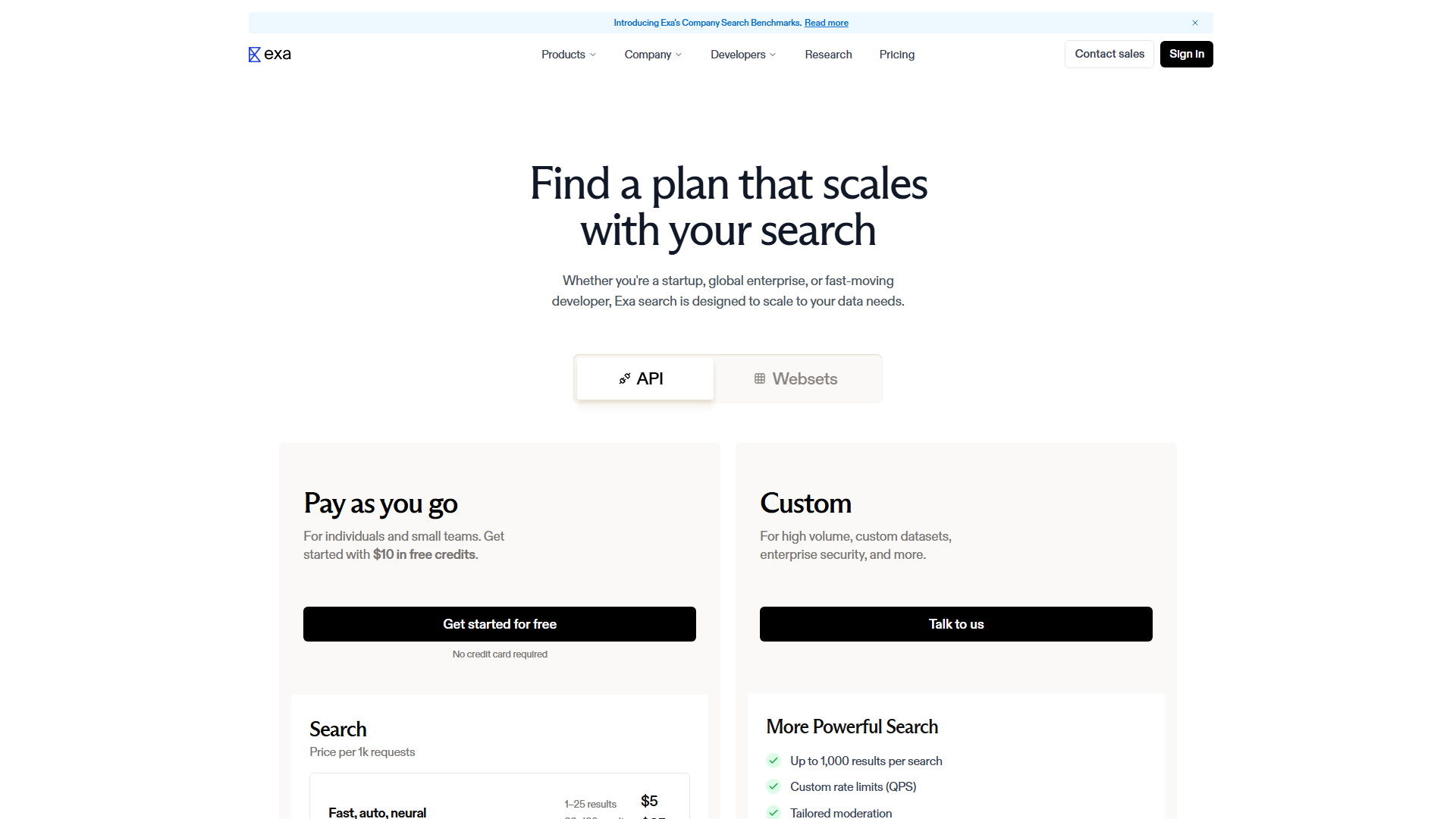
Exa uses a usage-based pricing model that lets you pay for exactly what you use. This is great for startups that need to scale but can be tricky to manage if your usage is unpredictable. They offer a few different ways to buy credits and subscriptions depending on your needs.
| Plan | Pric (exa.ai, firecrawl.dev)e | Best For | Key Limits |
|---|---|---|---|
| Free Tier | $10 free credits | Prototyping | No credit card required |
| Pay as you go | Usage-based | Small teams | $5 – $25 per 1k searches |
| Starter (Websets) | $49/mo | Sales/Recruiting | 8,000 credits included |
| Pro (Websets) | $449/mo | Growth teams | 100,000 credits included |
| Enterprise | Custom | Large companies | Custom QPS and SLAs |
Hidden Costs to Watch For
The biggest thing to watch for is the difference between “Search” and “Contents” costs. A search request might cost $5 per 1,000 requests, but if you also want to pull the text and summaries for those results, you pay an additional $1 per 1,000 pages. These costs are separate and can add up if you are pulling data for 50 results per search. Also, the Research Pro mode can be significantly more expensive because it uses more “Reasoning Tokens” to find answers.
Is It Worth the Price?
If you are building a production-level AI application, Exa is definitely worth the investment. The time you save on cleaning data and building scrapers usually outweighs the API costs. Compared to luxury options like a custom enterprise scraper, Exa is very affordable. However, if you only need very basic keyword searching for a small personal project, you might find the free tier of a general search API to be sufficient.
Ease of Use & Getting Started
Getting started with Exa is one of the smoothest experiences in the AI infrastructure space. You can sign up and get your first search result in under five minutes. The dashboard is clean and gives you immediate access to your API key and usage stats.
The learning curve is very shallow for anyone who has used a REST API before. They provide excellent SDKs for Python and JavaScript, which are the two most common languages for AI development. You do not need to learn a new query language. You can simply send natural language strings, and the engine handles the semantic mapping on the backend.
The onboarding process includes a “Playground” where you can test queries and see the JSON response in real-time. This is helpful for understanding how filters like includeDomains or category affect your results. The documentation is well-structured and focuses on practical code snippets rather than long theoretical explanations.
Integrations & API
Exa is built to live inside other tools. It is not a destination for humans but a pipeline for other software. Because of this, it has deep support for the most popular AI frameworks and developer environments.
Key Integrations:
- LangChain: Full support for RAG pipelines and autonomous agents.
- LlamaIndex: Easy tools for indexing web data into your vector stores.
- Cursor: Native integration for searching documentation and code repos.
- Notion: Powers the internal research tools for millions of users.
- n8n / Zapier: Can be connected to hundreds of other apps for automation.
The API itself is highly reliable. It features a “Fast” mode that returns results in less than 350ms, which is critical for real-time applications like chat bots. If you need more depth, you can toggle “Deep Search” or “Research” modes. These take longer but provide much higher quality data.
Customer Support
Exa offers solid support, though it is geared more toward developers than general users. Their primary channel for quick help is their Discord community. Here, you can talk directly to the engineers who build the product and get help with specific code issues.
For more formal requests, they offer email support and a detailed help center. The response times are generally good, usually within one business day for paid users. If you are on an Enterprise plan, you get a dedicated 1:1 onboarding specialist and a guaranteed SLA for uptime.
One of the best “support” features is their active blog and changelog. They are very transparent about new features and how their benchmarks are performing. This helps you stay on top of new capabilities like the 1-minute index updates or improvements to code search accuracy.
Security & Compliance
When you are feeding web data into your AI, security and privacy are top priorities. Exa takes this seriously by offering several enterprise-grade protections. They are SOC 2 Type 2 compliant, which is the industry standard for data security.
One of their standout features is Zero Data Retention (ZDR). For custom and enterprise users, Exa promises not to store the queries or the data you retrieve. This is essential for companies in regulated industries like finance or healthcare that cannot risk leaking sensitive internal prompts.
They also follow GDPR and CCPA guidelines for data privacy. This ensures that the web data they crawl is handled according to international laws. Their index is updated constantly, which also helps with compliance by ensuring that “right to be forgotten” requests are reflected in the search results quickly.
Who Should Use Exa?
Exa is a specialized tool that performs best in hands-on AI development environments. It is not a “one size fits all” search engine. Here are the types of users who will get the most value out of the platform this year.
Perfect for: AI Developers building RAG systems – The semantic search and clean text extraction make it easy to give your LLM the perfect context.
Great for: Recruiting and Sales Teams – Features like Websets allow you to find thousands of leads and enrich them with up-to-date profile data.
Also suits: Financial Researchers – The 1-minute index updates and historical data access are perfect for tracking market moves and company news.
❌ Exa is NOT For You If…
- You need a visual search engine for humans – Exa is an API for machines. If you just want to browse the web with a pretty interface, stick to Google or Perplexity’s consumer site.
- You are on a zero-dollar budget – While there is a free tier, production use requires a paid plan. If you cannot afford $5 per 1,000 searches, you might need to use a free but less accurate alternative.
- You only need to search your own files – Exa is for searching the public web. If you only want to search your internal company documents, you should look at a dedicated vector database or RAG tool like Pinecone.
What Real Users Are Saying
The feedback on Exa is overwhelmingly positive from the technical community. Developers on Reddit and Twitter often praise it for its speed and its ability to find “hidden gem” links that Google misses. Many note that it has completely replaced SerpAPI in their AI stacks.
Most Praised: The neural search quality and the speed of the Fast endpoint.
Most Criticized: The complexity of the usage-based pricing and the lack of a large library of pre-built integration templates.
Average Rating: 4.6/5 across major developer forums and review platforms.
One user on Reddit mentioned that “Exa finds the technical docs that Google buries on page five.” Another developer noted that the “Answer endpoint saved them weeks of writing summarization logic.” The general consensus is that it is a “developer-first” tool that actually understands what an AI agent needs.
Top Alternatives to Consider
While Exa is excellent, it is always smart to look at the competition. Depending on your specific project, one of these alternatives might be a better fit for your budget or your technical requirements.
| Alternative | Best For | Starting Price | vs Exa |
|---|---|---|---|
| Tavily | AI Agents/RAG | $10/mo | Similar focus but different pricing model |
| Perplexity API | Direct Answers | Usage-based | Better for conversational Q&A |
| Serper.dev | Standard Google data | $0.001/search | Cheaper but less semantic depth |
| Firecrawl | Deep Web Scraping | $19/mo | Better for crawling entire sites |
Common Issues & How to Fix Them
Even the best tools have a few quirks. Here are three common issues users run into with Exa and how you can solve them without pulling your hair out.
High Latency on Research Tasks
- Problem: When using the Research or Research Pro endpoints, responses can take 10-30 seconds.
- Solution: Use these endpoints asynchronously. Show a loading state to your users or run them as background tasks rather than waiting for a real-time response.
Rapid Credit Consumption
- Problem: You set up an agent and it burns through your $10 in credits in an hour.
- Solution: Add limiters to your loops. Ensure you are only requesting the number of results you actually need, and avoid using “Deep Search” for every single query.
Formatting Messy Web Content
- Problem: Some scraped pages still have a bit of noise or weird characters in the text.
- Solution: Use the “Highlights” feature instead of pulling the full text. Highlights only return the most relevant snippets, which are usually much cleaner and easier for an LLM to process.
Final Verdict
Exa has successfully moved past the “Metaphor” name to become a power player in the AI infrastructure world. It is not just another search engine. It is a specialized machine that helps AI agents understand the vast, messy world of the internet. If you are building anything that requires your AI to “think” using real-world data, Exa is the best tool for the job.
It offers a combination of speed, accuracy, and depth that traditional search engines simply cannot match. While the pricing can be a bit of a puzzle at first, the performance gains are undeniable. I highly recommend it for any serious AI development project this year.
Rating: 9.2/10 – The definitive search engine for the age of AI agents.
FAQ
What happened to the exa Linux command line tool?
The original “exa” command was a popular Rust-based replacement for the “ls” command. It is no longer maintained by its original creator. Most users have now switched to “eza,” which is a community-maintained fork that carries on the same features. This search engine company, Exa.ai, is a completely separate entity and has nothing to do with the Linux command line utility.
Is there a free tier for developers?
Yes, Exa offers a very friendly starting point for new developers. You get $10 in free credits just for signing up, and you do not need to enter a credit card to start testing. This is enough to run a few hundred standard searches or a handful of deep research tasks. It is perfect for seeing if the semantic results are better than what you are currently using.
How does Exa help AI models avoid hallucinations?
Hallucinations usually happen when an AI model doesn’t have enough facts to answer a question, so it makes something up. Exa provides the model with “grounding” data—real, verified snippets from the web. By giving the model the exact text and citations it needs to answer a query, Exa ensures the model stays rooted in reality. Their minute-by-minute updates also mean the AI won’t rely on outdated information.
How does semantic search handle complex queries?
Traditional search looks for exact words. If you search for “liquid that helps plants grow,” it might miss a page that only says “water is essential for flora.” Semantic search understands the concept. Exa converts your query into a mathematical vector and finds other pages that are close to that vector in meaning. This allows it to handle complex, natural language questions that would confuse a keyword-based tool.
What is the exact starting price for production?
Once you move past the free credits, you enter the pay-as-you-go tier. Standard search requests cost between $5 and $25 per 1,000 requests depending on how many results you want. If you need the advanced Websets features for large-scale data collection, those plans start at $49 per month. This tiered approach makes it easy to start small and only pay more as your application grows.
