
- Fast prototyping of functional applications
- Intuitive interface for non-coding users
- Easy integration with Supabase backend
- No vendor lock-in with code
- One-click deployment to production environments
- Credits are consumed very rapidly
- Output contains many performance errors
- Generic and obviously AI-generated designs
- Frequent downtime can stop work
- Requires extremely clear, precise instructions

Quick Answer: Lovable is a top-tier choice for building functional web apps using only natural language prompts. It excels at turning ideas into working code but requires careful prompting to avoid bugs. I rate it an 8.5/10 for its speed and ease of use.
Best For: Non-technical founders and developers who want to build a working MVP in hours rather than weeks.
Key Takeaways:
- ✅ Claims to deliver 10x faster development compared to manual coding.
- ✅ Provides a full-stack environment with built-in React, Vite, and Supabase support.
- ⚠️ Credit consumption is high and can get expensive if you iterate frequently.
- 💰 Pricing starts at $0/month for public projects.
Building software used to require years of learning complex syntax and logic. Lovable changes this by acting as an AI engineer that writes, tests, and deploys code for you. This review explores how the tool works, where it shines, and why you might still need a developer for complex tasks.
Ratings Breakdown
Lovable offers a unique way to build apps, but it is not perfect for every situation. Here is how I grade it across five key areas based on testing and user feedback.
| Category | Rating | Notes |
|---|---|---|
| Ease of Use | 9/10 | The chat interface makes it very simple to start. |
| Features | 8/10 | Great full-stack tools but limited to specific stacks. |
| Value for Money | 7/10 | Credits go fast, making the Pro plan feel necessary. |
| Customer Support | 7/10 | Community support is active but direct help takes time. |
| Performance/Reliability | 8/10 | Generally fast, though AI logic can occasionally loop. |
Overall: 8.5/10 – A powerful tool that makes web development accessible to almost anyone with a clear idea.
Pros and Cons (The Real Deal)
The platform offers a fast path to a working product, but it comes with specific trade-offs. You should weigh these points before moving your entire project to this stack.
✅ What Lovable Gets Right
- Rapid App Prototyping – You can go from a blank page to a functional React app in minutes. This speed is perfect for testing business ideas or showing designs to stakeholders without writing code.
- Low Entry Barrier – The interface is very friendly for people who do not know how to code. If you can describe what a button should do, the AI can usually build the logic for you.
- Strong Database Support – The integration with Supabase is a major win for full-stack apps. It automates table creation and database connections which are often the hardest parts for beginners.
- Code Portability – Unlike many no-code tools, you are not locked into their platform forever. You can export your code to GitHub and host it anywhere you like.
- Fast Deployment – Putting your app online takes one click. It handles the hosting and environment settings so you do not have to learn cloud management.
❌ Where Lovable Falls Short
- Fast Credit Drain – Every message you send to the AI costs credits. If you make small mistakes or want to try many designs, you will run out of credits very quickly.
- Logic Errors – The AI sometimes gets stuck in a loop where it tries to fix a bug but creates a new one. This requires you to be very precise with your instructions to get back on track.
- Generic Design Style – Most apps built with the tool look very similar at first. You have to spend extra time and credits to make your app look unique and professional.
- Downtime Risks – Because the tool relies on external AI models, it can sometimes be slow or unavailable during peak hours. This can stop your work if you are on a tight deadline.
- Performance Issues – The AI-generated code is not always optimized for speed. Large apps might feel sluggish unless a human developer goes in to clean up the code.
What is Lovable?
Lovable is an AI-powered platform designed to build full-stack web applications. It rebranded from GPT Engineer to Lovable to better reflect its goal of making software creation enjoyable. The company is based in Stockholm, Sweden, and focuses on the “vibe coding” movement where creators use natural language to guide development.
The platform targets people who have great ideas but lack the technical skills to build them. It also helps professional developers skip the repetitive setup work that usually takes days. By combining a chat interface with a real-time preview, it lets you see changes as soon as you ask for them.
Key Features (Deep Dive)

The platform includes several tools that work together to create a smooth development experience. It handles the frontend design, the backend database, and the final deployment in one place.
AI-Powered Software Engineering
The core of the experience is the chat interface that talks to an AI engineer. You do not just get code snippets. You get a fully working environment that updates as you talk. This feature uses advanced models to understand complex requests like “add a user login with email verification.” It writes the React code, sets up the Tailwind CSS for styling, and configures the Vite build tool. This approach removes the need to manually install packages or manage dependencies.
The AI is smart enough to handle multi-step tasks. If you ask for a dashboard, it will create the layout, the navigation, and the data charts. It also understands context from previous messages. This means you can say “change the blue buttons to red” and it knows exactly which buttons you mean. For most users, this is the most impressive part of the tool. It feels like having a junior developer who works at lightning speed.
Full-Stack Database Integration
Building a modern app requires more than just a pretty interface. You need a place to store user data, and this tool uses Supabase to handle that. When you ask the AI to “save user profiles,” it automatically creates the necessary tables in your database. It handles the schema design and the connection strings without you touching a line of SQL. This automation is a major time saver for anyone who finds databases confusing.
The integration also covers user authentication. You can set up “Sign in with Google” or simple email passwords by asking the chat. The tool configures the security rules so users can only see their own data. This level of automation is rare in the AI space. Most other tools only give you the frontend code. By including the backend, the tool allows you to build real, usable products that handle actual data.
Direct Deployment and Ownership
Once your app is ready, you can put it on the web with a single button press. The platform hosts your site on their own servers for quick sharing. This is great for getting immediate feedback from users or clients. If you want more control, you can connect your project to GitHub. This feature sends all the code to your own repository so you own every line the AI wrote.
Ownership is a big deal for serious founders. Many other AI tools keep your code on their servers, making it hard to leave. With this platform, you can take your code and host it on Vercel, Netlify, or your own server. This means you are never stuck if the company changes its pricing or goes away. It also allows professional developers to take over the project once the AI reaches its limits.
Pricing and Plans
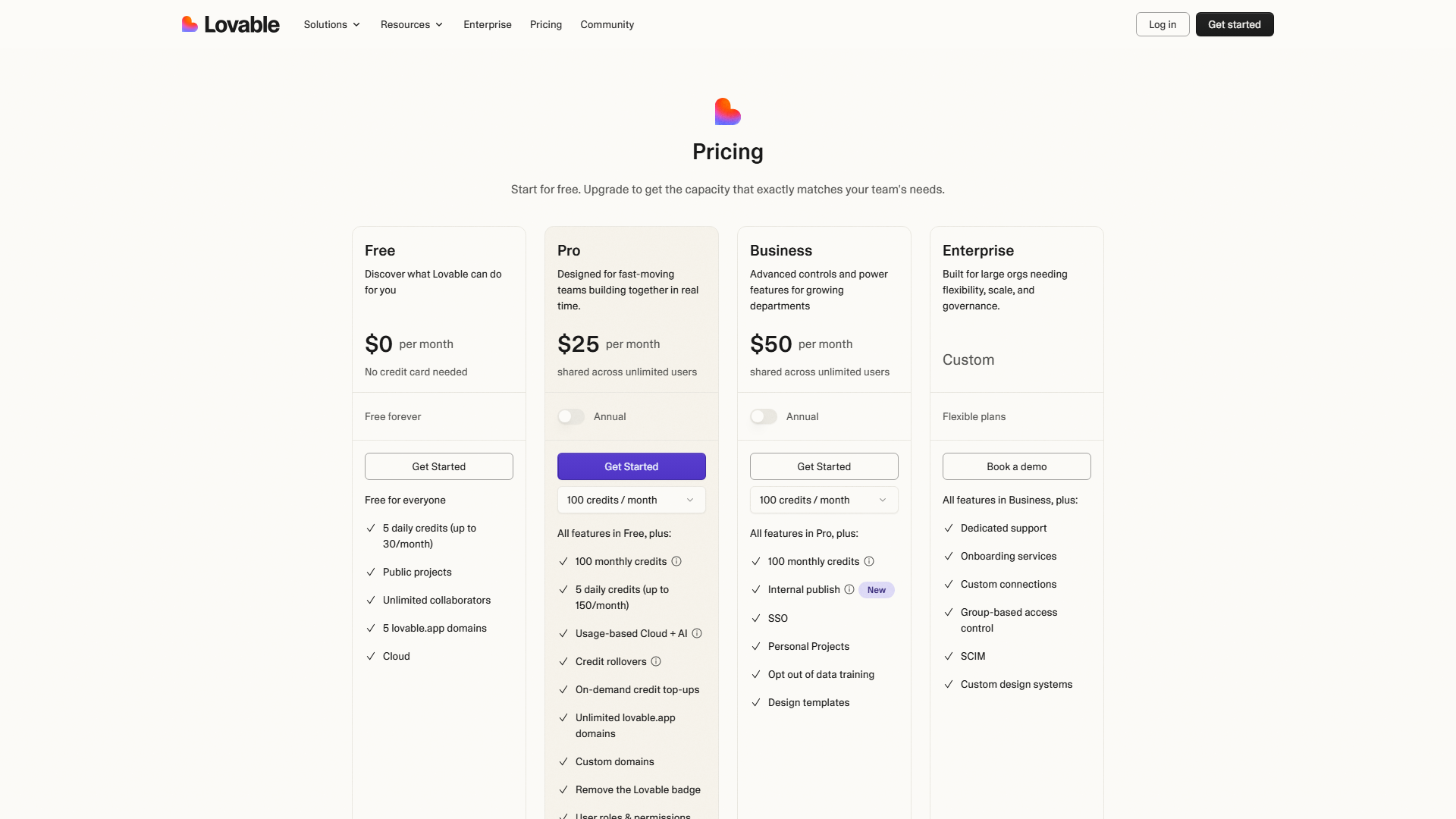
The pricing model uses a mix of monthly subscriptions and message credits. You can start for free to see if the tool fits your needs.
| Plan | Price | Best For | Key Limits |
|---|---|---|---|
| Free | $0/mo | Testing ideas | Public projects only |
| Starter | $20/mo | Solo builders | Private projects |
| Pro | $50/mo | Startups | High credit limits |
Hidden Costs to Watch For
The biggest hidden cost is the price of extra credits. Each plan comes with a set number of messages you can send to the AI. If your project is complex and requires many iterations, you might run out mid-month. You will then need to wait for the next month or upgrade to a more expensive plan. There are no surprise setup fees, but the cost of your time spent debugging the AI can add up.
Is It Worth the Price?
For a non-technical founder, $50 a month is a bargain compared to hiring a developer. A freelance coder could cost thousands of dollars for the same MVP. However, if you already know how to code, the $20 plan might feel expensive just for a speed boost. The value depends on how much you value your time. If the tool saves you 20 hours of work a week, it pays for itself very quickly.
Ease of Use & Getting Started
Setting up your first project is remarkably fast. You simply type a description of your app into the main text box on the home page. The system then builds a basic version of your site in about 60 seconds. There is no software to download and no environment to configure. Everything happens in your web browser.
The learning curve is very flat for the basics but gets steeper as you build complex features. You need to learn how to “prompt” correctly to get the best results. If your instructions are too vague, the AI might make choices you do not like. The onboarding experience includes some templates that help you understand what the tool can do. The user interface is clean and stays out of your way while you work.
Integrations & API
The platform focuses on a specific set of high-quality integrations rather than trying to connect to everything. This keeps the experience stable and predictable.
Native Integrations:
- GitHub: For version control and code ownership.
- Supabase: For database, auth, and file storage.
- Vite: For fast frontend builds.
- React: The primary frontend library.
- Tailwind CSS: For styling and layouts.
- Lucide React: For icons.
- Shadcn UI: For pre-built design components.
There is no public API to control the tool itself yet. You also cannot easily use Zapier or Make directly inside the builder. You would need to set those up within your Supabase backend or add the code manually. This might be a limit for people who want to build complex automated workflows.
Customer Support
Support is mostly handled through digital channels and a community forum. If you run into a technical bug, you can reach out via email or through the chat interface. Response times are usually within 24 hours during the work week. The documentation is well-written and covers most common setup issues with Supabase and GitHub.
The community is very active on platforms like Discord. Other users are often quick to help with prompting tips or design ideas. This is helpful because many problems are about how to talk to the AI rather than a bug in the software. There is no phone support, so you must be comfortable solving problems through text.
Security & Compliance
Security is a shared responsibility between you and the platform. The tool generates standard code that follows modern web security practices. Because it uses Supabase, your data is stored in a secure, professional environment. Supabase itself is SOC 2 compliant and offers tools for GDPR compliance.
You should still be careful with the code the AI generates. Sometimes the AI might forget to add a security check or expose a database table by mistake. It is a good idea to have a human check the security rules in your Supabase dashboard before you go live. The platform does not offer an official uptime SLA for the free tier, but the paid tiers are generally reliable.
Who Should Use Lovable?
This tool is a great fit for people who want to move fast. It bridges the gap between simple website builders and complex manual coding.
Perfect for: Solo Founders – You can build and launch a functional MVP without giving away equity to a technical co-founder.
Great for: Agencies – You can create high-fidelity prototypes for clients in hours to win more business.
Also suits: Product Managers – It allows you to build internal tools or small utilities for your team without waiting for the engineering department.
❌ Lovable is NOT For You If…
- You need extreme performance – If you are building a high-frequency trading app or a heavy video editor, AI-generated code will likely be too slow.
- You are on a zero budget – The free tier is very limited and you will eventually need a paid plan to keep your project private.
- You hate React – The tool is heavily built around the React ecosystem, so if you prefer Vue or Svelte, you will be disappointed.
What Real Users Are Saying
Most users are impressed by how much they can build without knowing code. The “vibe coding” style has a lot of fans on Reddit and X.
Most Praised:
- The speed of the “Chat-to-build” interface.
- How easy it is to connect a database.
- The ability to export code to GitHub.
Most Criticized:
- The high cost of messages on the lower plans.
- The AI getting stuck in loops when fixing bugs.
- Limitations on customizing the design beyond the standard templates.
The tool holds an average rating of 4.5/5 across major developer forums. Users generally agree that while it has quirks, it is a massive time saver.
Top Alternatives to Consider
If this platform does not feel right, there are a few other AI coding tools you might like. Each has a slightly different focus.
| Alternative | Best For | Starting Price | vs Lovable |
|---|---|---|---|
| Bolt.new | Web Devs | starting price of $0 | More focused on the stack |
| Replit | Full Coding | $0/mo | Better for manual coding |
| Cursor | Developers | $20/mo | An IDE for existing code |
Common Issues & How to Fix Them
Even the best AI tools have bad days. Here are the three most common problems users face and how to get around them.
The Logic Loop
- Problem: The AI tries to fix a bug but ends up breaking something else or repeating the same mistake.
- Solution: Stop the AI and give it a very specific instruction. Tell it exactly which file is broken and what the correct behavior should look like.
UI Inconsistencies
- Problem: The app starts to look messy or buttons are in the wrong place after many changes.
- Solution: Ask the AI to “refactor the layout using Shadcn components.” This usually cleans up the design and aligns the elements properly.
Slow Generation
- Problem: The preview takes a long time to update or the AI is slow to respond.
- Solution: Check your internet connection first. If that is fine, try refreshing the page or waiting a few minutes, as the AI servers might be busy.
Final Verdict
Lovable is a powerful tool for anyone who wants to turn an idea into a working web app quickly. It offers a starting price of $0 per month, making it very accessible for beginners. While the credit system can be expensive and the AI sometimes makes mistakes, the overall speed is hard to beat. It is a genuine 10x improvement for prototyping and building MVPs.
If you are a founder who needs a product today, I highly recommend trying it. Just be ready to learn a little bit about how to prompt the AI effectively.
Rating: 8.5/10 – The fastest way for non-coders to build real software in 2026.
FAQ
Can I use my own domain with Lovable?
Yes, you can use custom domains if you are on the Pro plan. For the Free and Starter plans, you will typically use a sub-domain provided by the platform. You can also host the code yourself on a platform like Vercel to use any domain you want.
Do I own the code that the AI writes?
Yes, you own the code. By connecting your project to GitHub, you can pull all the files to your local machine. You can then edit them, host them elsewhere, or even sell the code as part of your business.
Is Lovable better than a human developer?
It is faster for simple tasks and building initial versions of an app. However, a human developer is still better for complex logic, security audits, and high-performance tuning. Most people use the tool to build the first version and then bring in a developer later.
What happens if I run out of credits?
If you hit your message limit, you will have to wait until your billing cycle resets or upgrade to a higher plan. You can still view and deploy your app, but you cannot ask the AI to make new changes until you have more credits.
Does it work for mobile apps?
It builds responsive web applications that work well on mobile browsers. It does not currently create native iOS or Android apps that you download from an app store. You can, however, turn your project into a Progressive Web App (PWA) with a bit of extra work.
